Blogger template constitute 2 formats
1 .xml format - this is a new template format
2 html format -This template was old template
If you are blogger, the template is the new format .xml template commonly used.
However if you a activist adsense and make your blog as your source of income surely and using 3 column blogger template for adsense.The template was prepare by isnaini .com. the problem is adding wideget to the template.So now i have technique to add wideget to 3 column bloggerize adsense.
If you are a blogger and want to try using bloggerize adsense as a template to increase income from google adsense you can download bloggerize template here
I'am using bloggerize adsense template pretty old but have problems when want to put in wideget.This technique was find when try and error.So before you do something to your template save it first. If you receive mesage to delete wideget don't do that because the wideget will delete.
What you must do is you find the wideget and rename it.I will discuss this topic on next discussion.
Let's to main problem to adding wideget to 3 column bloggerize adsense.
Step 1:Log in to your blog
Step 2: click customize
Step 3: find tab Edit HTML
In this technique i will add wideget at the rightsidebar below Alexa traffic.Before this technique below alexa traffic is subscribe like this.
Now i want add new wideget with Favorite link.

Step 4: Skroll down the HTML code and find code below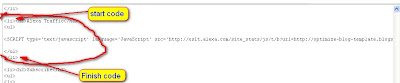
Step 5: Copy all code from <li> to </li>
Step 6: Paste below like this
Step 7: Rename Alexa Traffic word with favorite Link
Step 8: insert your link or java or anything there
Step 9: Click save template changes
Step 10: view your blog
FINISH your job

READ MORE - how to insert wideget on bloggerize adsense template
1 .xml format - this is a new template format
2 html format -This template was old template
If you are blogger, the template is the new format .xml template commonly used.
However if you a activist adsense and make your blog as your source of income surely and using 3 column blogger template for adsense.The template was prepare by isnaini .com. the problem is adding wideget to the template.So now i have technique to add wideget to 3 column bloggerize adsense.
If you are a blogger and want to try using bloggerize adsense as a template to increase income from google adsense you can download bloggerize template here
I'am using bloggerize adsense template pretty old but have problems when want to put in wideget.This technique was find when try and error.So before you do something to your template save it first. If you receive mesage to delete wideget don't do that because the wideget will delete.
What you must do is you find the wideget and rename it.I will discuss this topic on next discussion.
Let's to main problem to adding wideget to 3 column bloggerize adsense.
Step 1:Log in to your blog
Step 2: click customize
Step 3: find tab Edit HTML
In this technique i will add wideget at the rightsidebar below Alexa traffic.Before this technique below alexa traffic is subscribe like this.
Now i want add new wideget with Favorite link.

Step 4: Skroll down the HTML code and find code below

Step 5: Copy all code from <li> to </li>
Step 6: Paste below like this

Step 7: Rename Alexa Traffic word with favorite Link
Step 8: insert your link or java or anything there
Step 9: Click save template changes
Step 10: view your blog
